Form Ticket (Deposit USD)
Creation
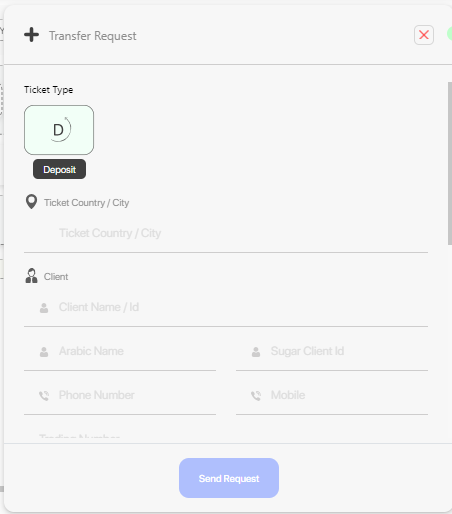
- You can submit a new ticket by the form.
 {: style="width:300px"}
Process
Approve
After submit the ticket, it will be routed to specific employees to process it based on routing system.
 {: style="width:300px"}
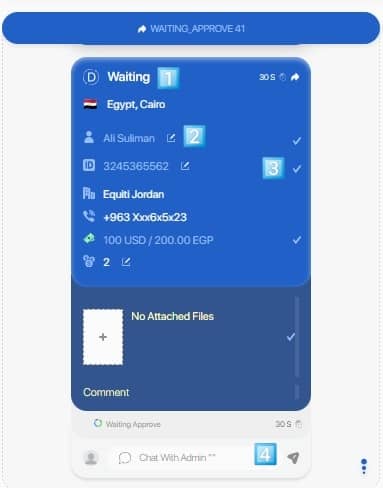
Four things to mention here:
- The ticket has not RF yet.
- Fields like (name, account number, rate, attachments) can be edited.
- Confirm the field value at the end.
- After confirm all editable fields a new button will appear say "Approve & Send", click it to approve the ticket.
When approve the ticket, the approve handler specified for this type of tickets (form_ticket) will run.
Approve handler of form_ticket contain these steps:
- Send ticket to odoo and get an RF.
- Redirect it to custom chats with custom template based on routing system.
Apply
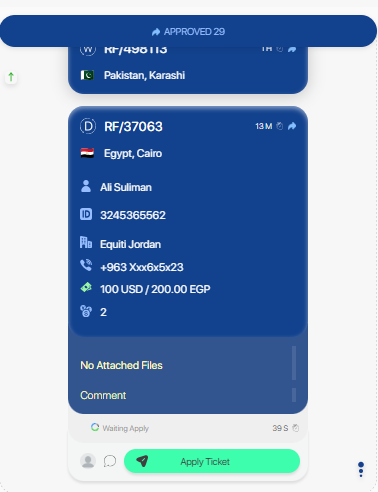
The ticket can be applied from the ticketing page by the employee.
 {: style="width:300px"}