Pakistan Ticket (Withdrawal USD)
Setup
- Just setup the ticket routing system.
Creation
- Pakistan ticket is one of the tickets received from odoo using this API.
title="POST /accounting_backend/public/api/v1/odoo_tickets", hl_lines="9"
{
    "Request": "RF/498929",
    "Client": "Rabab Ali Fahmi Abu Taweeleh",
    "PhoneNumber": "False",
    "mobile": "+20 102 442 4052",
    "TradingNumber": "False",
    "SugarClientID": "C00371991",
    "amount": "500.00",
    "DestinationCountry": "Pakistan",
    "DestinationCity": "karashi",
    "OperatingUnit": "Equiti Jordan",
    "CommissionType": "Equiti Jordan",
    "TransferDate": "2024-02-13 11:05:12",
    "Currency": "USD",
    "LocalCurrency": "PKR",
    "LocalCurrencyAmount": "0.00",
    "ArabicName": "False",
    "comment": "False",
    "address": "False",
    "payment_type": "False",
    "key_address": "False",
    "vodafone_number": "01021066271"
}
!!! note
- Make sure that `Request` attribute have to be a unique value to create new ticket, otherwire the existing ticket id will return.
Validation
- No validation on this API.
Process
Approve
After pass all checks, the ticket will be routed to specific employees to process it based on routing system.
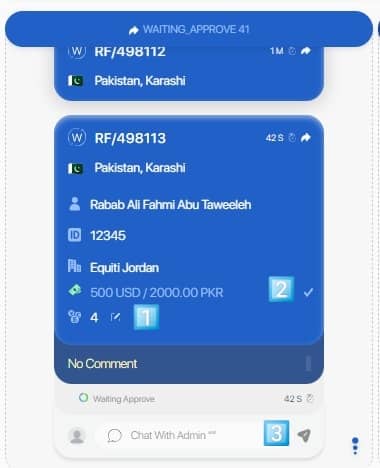
Four things to mention here:
- Rate field can be edited.
- Confirm the field value at the end.
- After confirm all editable fields a new button will appear say "Approve & Send", click it to approve the ticket.
When approve the ticket, the approve handler specified for this type of tickets (odoo_ticket) will run.
Approve handler of odoo_ticket contain these steps:
- Redirect it to custom chats with custom template based on routing system.
Apply
The ticket can be applied from the ticketing page by the employee.
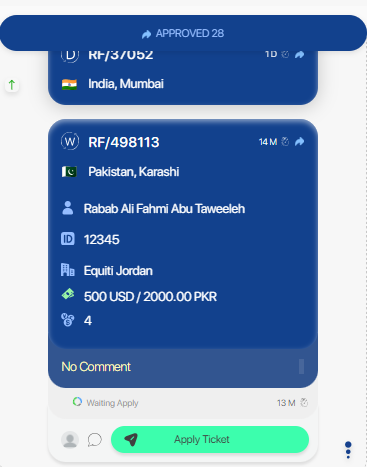 {: style="width:300px"}
Or by reply on the report with an image:
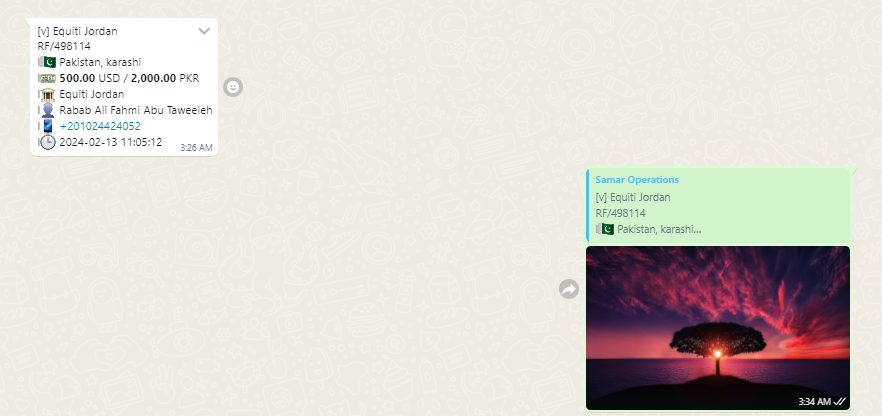 {: style="width:400px"}